
Introduction
Getting Started with Flow Myna
Flow Myna is an AI-powered process mining platform that helps you understand, analyze, and optimize your business processes. Upload your data, and let our intelligent agents automatically discover your process flows, identify bottlenecks, and generate actionable insights.
What is Process Mining?
Learn how process mining works and why it matters for your business.
Upload Your Data
Get started by uploading your CSV files using our data loading agent.
Explore Your Process
Visualize and analyze your process flow with interactive maps and variants.
AI Co-Pilot
Ask questions about your process in natural language and get instant answers.
Flow Myna transforms complex process data into clear, actionable insights. Whether you're analyzing loan applications, order fulfillment, customer support tickets, or any business process, our platform automatically understands your data structure and reveals how your processes actually work—not just how they're supposed to work.
From Data to Insights in 15 Minutes
Get started with Flow Myna by following this simple workflow:
1. Create Your Workspace
Sign in and create a workspace—your central hub for all process data and team collaboration. This takes about 1 minute.
Navigate to Flow Myna
→ Click "Create Workspace"
→ Enter workspace name: "Acme Financial Services"
2. Upload Your Process Data
Use our AI-powered wizard to upload your CSV files. Our intelligent agents automatically understand your data structure and create the necessary transformations. This takes 3-5 minutes.
# Example: Loan application data
loan_id,timestamp,activity,amount,risk_level,officer
L-001,2024-01-15 09:00,Application Submitted,50000,Medium,J.Smith
L-001,2024-01-15 10:30,Credit Check Complete,50000,Medium,System
L-001,2024-01-16 14:00,Risk Assessment,50000,Medium,M.Johnson
L-001,2024-01-17 11:00,Approved,50000,Medium,S.Williams
The wizard guides you through 5 steps:
- Select Process Type - Choose from templates or create custom
- Upload Files - Drag and drop your CSV files
- AI Auto-Mapping - Our agents analyze your data (2-3 minutes)
- Review Mapping - Verify the AI-generated structure
- Transform Data - Complete the import
Pro Tip
You don't need to prepare your data in any special format. Our AI agents automatically understand various CSV structures and create the right object-event relationships.
3. Create an Analysis Project
Set up a project to focus on specific aspects of your process. Select which object types (like loans, customers) and event types (like applications, approvals) to include. This takes 2 minutes.
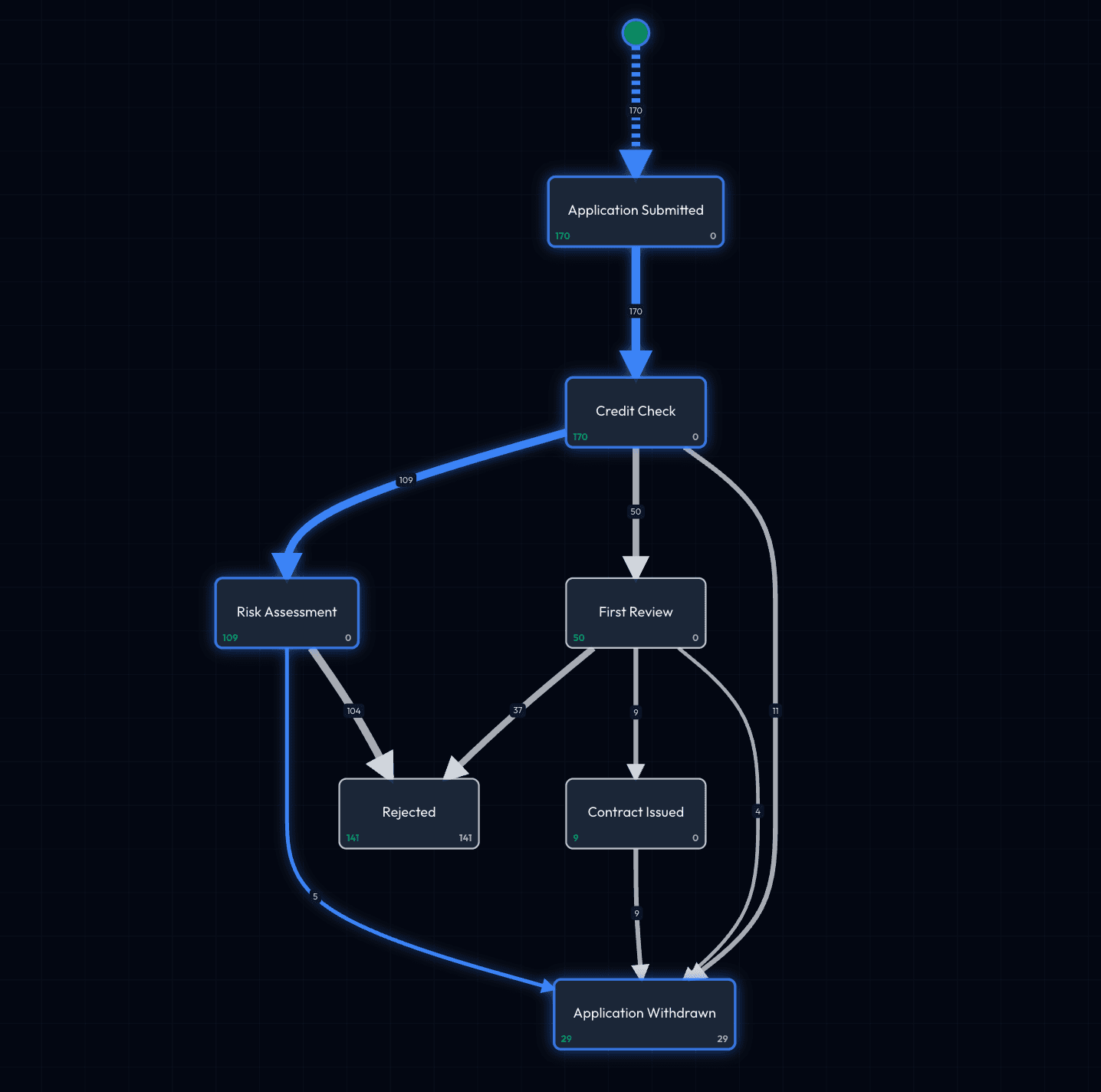
4. Explore Your Process Map
View an interactive visualization of your entire process flow. See how activities connect, where delays occur, and which paths are most common. This takes 3-5 minutes to explore.
5. Ask the AI Co-Pilot
Use natural language to ask questions about your process:
- "Show me loans that took longer than 14 days"
- "What's the average time from application to approval?"
- "Which risk assessments lead to rejections?"
The AI generates filters, charts, and insights automatically. This takes 4-5 minutes.
Core Concepts
Understanding these key concepts will help you get the most out of Flow Myna:
Objects and Events
Objects are the "things" in your process—like loan applications, customers, or invoices. Events are activities that happen to those objects, each with a timestamp.
In our loan example:
- Objects: Loan L-001, Customer C-12345, Officer J.Smith
- Events: Application Submitted, Credit Check, Approval Decision
- Relationships: Loan L-001 experienced "Application Submitted" at 09:00
Process Variants
Different execution paths through your process. For example:
- Standard Path: Application → Credit Check → Risk Assessment → Approval (70% of cases)
- Expedited Path: Application → Quick Assessment → Approval (20% of cases)
- Rejection Path: Application → Credit Check → Rejection (10% of cases)
Understanding variants helps you identify exceptions, rework loops, and optimization opportunities.
AI-Powered Analysis
Flow Myna's AI agents work continuously to:
- Understand your data automatically during upload
- Generate insights about bottlenecks and anomalies
- Answer questions through conversational interface
- Create visualizations tailored to your queries
What Makes Flow Myna Different
1. AI-First Design
Traditional process mining tools require manual data mapping and technical expertise. Flow Myna's AI agents automatically understand your data structure and create the necessary transformations—no data science degree required.
2. Object-Centric Approach
Most tools assume linear processes with a single case ID. Flow Myna supports complex, multi-dimensional processes where multiple objects interact (orders + customers + payments + shipments).
3. Conversational Analysis
Instead of writing SQL queries or learning complex interfaces, just ask questions in natural language: "Show me the slowest 10% of cases" or "Compare high-value vs standard workflows."
4. Real-Time Exploration
Apply filters and see your process map update instantly. No waiting for queries to run or reports to generate. Share your exact view with teammates using a simple URL.
Next Steps
Ready to dive deeper? Here's what to explore next:
Learn the Basics
- What is Process Mining? - Understanding the fundamentals
- Quick Start Guide - Detailed step-by-step tutorial
Follow the Workflow
- Creating Your Workspace - Set up your data hub
- Uploading Your Data - Detailed wizard walkthrough
- Creating a Project - Define your analysis scope
Master the Tools
- Process Map - Understanding visualizations
- Process Variants - Analyzing execution paths
- AI Co-Pilot - Conversational analysis guide
Advanced Features
- Filters & Exploration - Advanced filtering techniques
- Collaboration - Working with your team
Getting Help
Documentation
Browse our comprehensive guides to learn about specific features and workflows.
FAQ
Check our Frequently Asked Questions for quick answers to common questions.
Support
Need help? Contact our support team or use the in-app chat for assistance.
What you'll learn in this documentation
This documentation is designed for business users who want to understand and optimize their processes. You don't need technical expertise—just bring your process data and we'll guide you through the rest.
Each page includes:
- Clear explanations of concepts
- Step-by-step instructions
- Real-world examples using loan applications
- Tips and best practices
- Links to related topics